Initial impression on my Kinesis
9 min readKeyboard and Me#
Am being a software engineer for about 7+ years now, and a have been using vim for about like 6years now, i use keyboard a lot, i mean
alotttt. i use it for typing to navigate to scroll almost for most of the day to day tasks, i have been both linux and mac users for awhile
mostly with linux for my personal stuff and mac for org.
I also have an habit of creating too many .md files for anything like note taking, tasks scheduling, remainder, jira remainder, design docs
etc etc..
I bet if u get access to my personal/work computer u would end up finding 1000s of .md files, am i using all those or not is a different question, but am having an habit of creating md files for nearly my entire career.
I literally have a script, which basically creates month-day.md file on my todo folder on every day first login.
- Create jira ticket for the bug that i noticed, make an md FILE.
- Create an rfc for a feature, make an md FILE.
- PRs for me to give review, make a remainder md file.
- Studying a new thing, make a md FILE. etc etc..
keyboard plays a vital role, in my day to day life, i type alot and alot, it may not be useful for half of the time, but i have the habit of typing in digital screen more for not taking or anything that i have in mind. By this way i had the habit of getting more keyboards, during my initial days of my career i purchased second hand ones in my local market, once am financially stable i spend substantial amount for keyboard alone, i have like nearly 10+ keyboards rn sitting around my house somewhere.
I use keyboard not only for regular typing, i use it for file navigation, app navigation, quick switch between apps, on browser etc..
keys like cmd + backspace, option + backspace, option + left|right, cmd + left|right, and of course vim for various keys,
i also use vim across the operating system using some oss libraries to reduce the usage of mouse.
An year back i start to getting wrist pain, cant able to type longer periods and it was really frustrating for me, i reduced my usage i started to use mouse more, but it really frustrated my ux, i really felt slow on using mouse for things like browsing, switching tabs, when navigating jira, github prs etc,
Kinesis#
By this time, i came to know about ergonomic keyboards like kinesis advantage 2, moonlander ergodox, glove 80 etc…, as soon as i heard something like that, i immediately wanted to try one of those, i got the hands on kinesis advantage 360 shipped from US from one of my friend, it was very costly, everybody around me was bashing hell out of me for buying that.. but coz of my keyboard fetishness and also the pain that i have(an excuse btw), i really want to spent the money..
Day1#
I got the keyboard, it was so awesome looking for me, i started to unbox it and try to connect it with my laptop and was trying my first time, the typing experience was really really bad, i literally typed a single word for like 10-15 seconds, coz of the key arrangement and also the split nature(i did have like 1-2 days of experience on trying split keyboard though), but yeah i was very happy of getting this keyboard.
Day2#
I couldnt spent much time on the day i got the keyboard(due to some other personal work), 2nd day was the one which i spent almost entire day with kinesis, i was first going through the docs and understand things like layering, zmk configuration etc.. i put all those aside and started to really spend(type) on the keyboard… everyone who purchases the keyboard literally knows the complexity of getting used to this keyboard, i too know those before buying this, but once i got my hands on, i got to know that it was way worse complex than its mentioned over the internet.
First things, i dont know how to touch type(home row typing), i generally types on a regular keyboard with only 5-6 fingers(combining both hands) i never used pinky for typing characters, i never used left index finger for pressing b etc(all these comes under touch or homerow typing) so naturally my muscle memory kicked in, but in kinesis this is impossible, since its split in nature u cant use ur right index finger to type b or you cant use ur left index finger to type y…
You literally needs to know touch type(most recommended), to get least comfortable on this keyboard, initially i tried to use kinesis without touch typing and starts to randomly type keys with my existing muscle memory, but i literally cant and it was very very difficult..
So i started to learn touch typing daily, also the idea of kinesis is to use your thumb more, so keys like enter, space, backspace, ctrl, alt, cmd etc all will be accessible in both thumbs, instead of corners… my learnings increased now touch typing, usage of thumb, forgetting years and years of my muscle memory.
Week2#
On the first week, it was so weird, i almost started to give up on this keyboard, my wpm was like 5 or 6, everything was bad.. but i just simply learning touch typing, trying to use the keyboard all day including my work(this is most frustrating part) for a week..
Week2 i did saw a great improvement, i was now able to reach all the keys with my fingers, my muscle memory beginning to unlearn things and i can literally see that in action, still there were some issues like, mostly i press n when i want to press b, i forget whether backspace is in my right thumb cluster or left and same for space and enter, but overall i really felt great improvement.
Now here comes the most difficult part, we developers mostly use symbols like { }, [ ], ( ), ' " := etc, these symbols were in most difficult location to
access in kinesis, all these keys were very hard for me to hit it on first try, i tried with various ways of using those keys, but none worked out, it was
always difficult for me to hit it, finally i thought of giving it a try with layered approach, the idea is simple the base layer will only have my alphabets and
numbers, the second layer will have all my symbols in my homerow itself, this may take some time for me to learn but i feel this could be really useful
once i got mastered.
These were my layered print
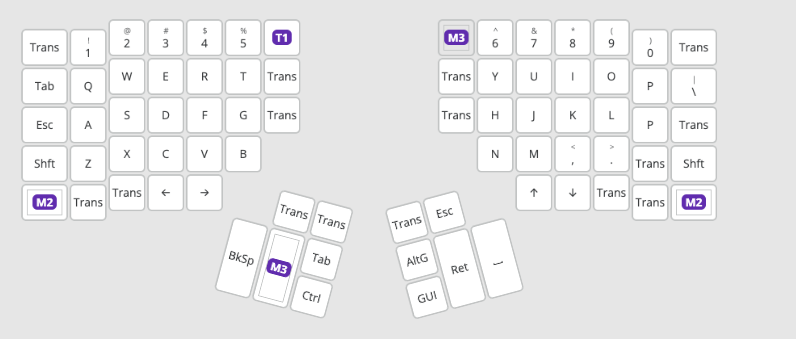
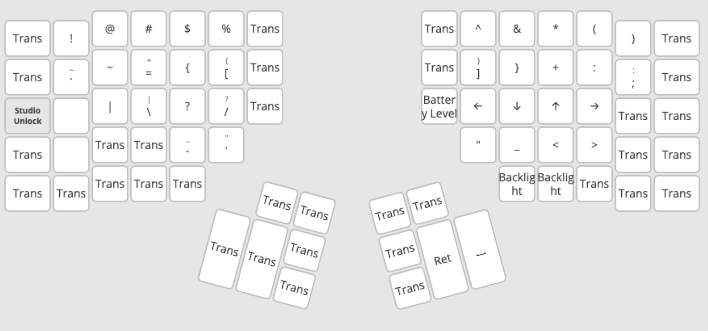
On week2 i almost got like 40-50 WPM with only characters on monkeytype and typingtest.com(stories).
Week3#
By this time, i was using my keyboard most of the times with less mouse involve, i was so slow, but i really felt no pain in my wrist also on my finger joint(metacarpophalangeal joint)..
Week3 i was mostly using based on homerow typing style, with one exception where i used p with my ring finger.. btw homerow typing is just a typing style, u definitely need not to type like this, but homerow typing is more advantage it keeps ur hand position neutral and doesnt allow u to travel more for the keys
This week i was mostly practicing my layering stuff also navigation, i use opt + 1(for my terminal)|2(for my browser)|3(slack)..,
i was more practicing along these keys, i also practiced programming typing on keybr.com with sourcecode typing settings enabled.
Now#
Its been like 20+ days since i got hands on with this kinesis, now i am way more comfortable to work compared to my initial day 1 or week1,
right now i can able to hit 80+ wpm constantly on monkeytype or keybr, also in real life am getting faster like my old days with less to 0
pain to my wrist or joint.
Still sometimes am doing some mistakes on vim like db(deleting a word backwards), ctrl + a and then [(on tmux this enables vim mode and navigate the terminal with vim mode) etcc, but overall am in way good shape now compared to my initial days, and happy what am doing right now as well with the keyboard.
On the whole, i feel this is a really good keyboard, but ofcourse this takes hell lot of time to get used to, i didnt conveyed the full process i gone through during my learning(i literally spend hours on typing these during my week1 and 2).
If you are a keyboard enthusiast or if u really have any health issues on using keyboards for longtime and if u are ok to spend good amount of money i would highly recommend to try this keyboard, am sure u would need to unlearn lot of things, u may get frustrated and goes back to ur old one etcc, but all these would fade away if u really spend time to learn something new and it will be wonderful once u gone through that phase.
Downsides#
- This keyboard is so hefty, if you are planning to carry around everywhere like to your workplace and again to your home, this could be a real troublesome.
- With my limited usage rn, i can feel that if am using anyother keyboard like normal ones or the laptop ones, the learning curve of kinesis increase more, i hope this wont be a problem after long time usage of kinesis.
- The price, i cant say that it deserves its pricing, i can confirm that its price is way too high and not sure why their pricing strategy is like that.
- Also from india, you cant get this keyboard directly there are no vendors, they are but they will basically ship from us and pay hefty customs, you end up paying 2x the amount of original keyboard price.
To conclude, i wanna say if you are really comfortable with whatever keyboard you are using now. If you are keyboard enthusiast or if you realy have pain as said earlier, you can give this a shot and remember learning this keyboard will take a substantial amount of your daily time, prepare for all of this and i would say these are just part of learning something new.
Finally…. Whatever the keyboard you are using, learn to use it to fullest, utilize its things, every software engineer almost spends their entire time using keyboard, so learn to use it better to make ur workflow faster, use mouse as limited as possible.. there are various tools to do this, learn about those and be blazingly fastttt..