Kubernetes Routing
5 min readWe devs all know Kubernetes and its mass usage across the globe in all software products, this blog is not going to be explaning about kubernetes rather this will focus on how typically routing works on kubernetes.
TL;DR: How a request reaches your pod that is inside your K8s cluster?
Some basics of Kubernetes#
Every k8s cluster has set of components called
- Pod: Our actual application lives here inside a container. (lives on worker node)
- Service: Not a code or not a server, its just a plain object that have some routing rules to pod and lives in
etcd.( stored in etcd(master node), read by worker node kernel) - Ingress: Similar to
service, not a code or server, just a plain object which has rules fromhost to service. (stored in etcd(master node), read by ingress controller pod on worker node).
Kubernetes cluster usually has two planes(nodes) Master and Worker planes(nodes).
-
Master Node
- It has components like
etcd(storage),kube-apiserver,scheduler,control-manager. - etcd: KV database.
- kube-apiserver: All internal request goes here, eg: service route tables, kubectl, controllers etc
- scheduler: Decides which
node(worker) should run a pod. - control-manager: Kinda State machine.
- It has components like
-
Worker Node
- It has
kube-proxy,podsetc. - kube-proxy: handles service to pod traffic from worker node via iptables or ipvs or ebpf.
- pods: our actual application lives inside a container.
- It has
How a request reaches the pod#
There are many ways a request can reach a pod based on the configuration in k8s.
- Via Service
we can reach our application pod through external (public internet) or internal(inside cluster).
There are three kinds of services in k8s
- ClusterIP: Used for internal usage, all pods from different nodes inside the same cluster
can able to access each other, but
clusterIPis not reachable to anyone outside the world.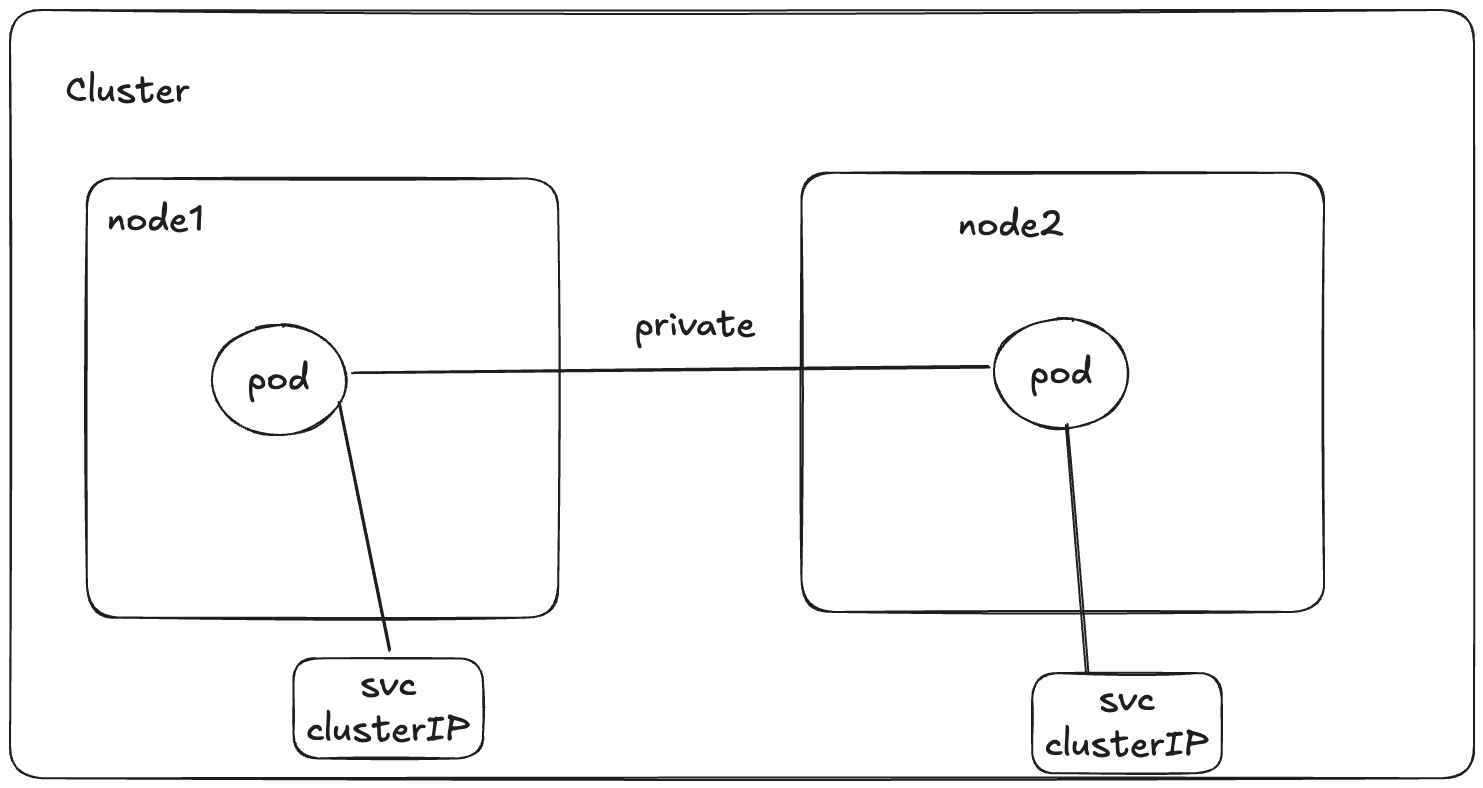
- NodePort: This exposes a specific port on
all the nodesinside the cluster, irrespective of whether a pod belongs to that node or not, for accessing your pod(application), u need to enter<NODE_IP:PORT>.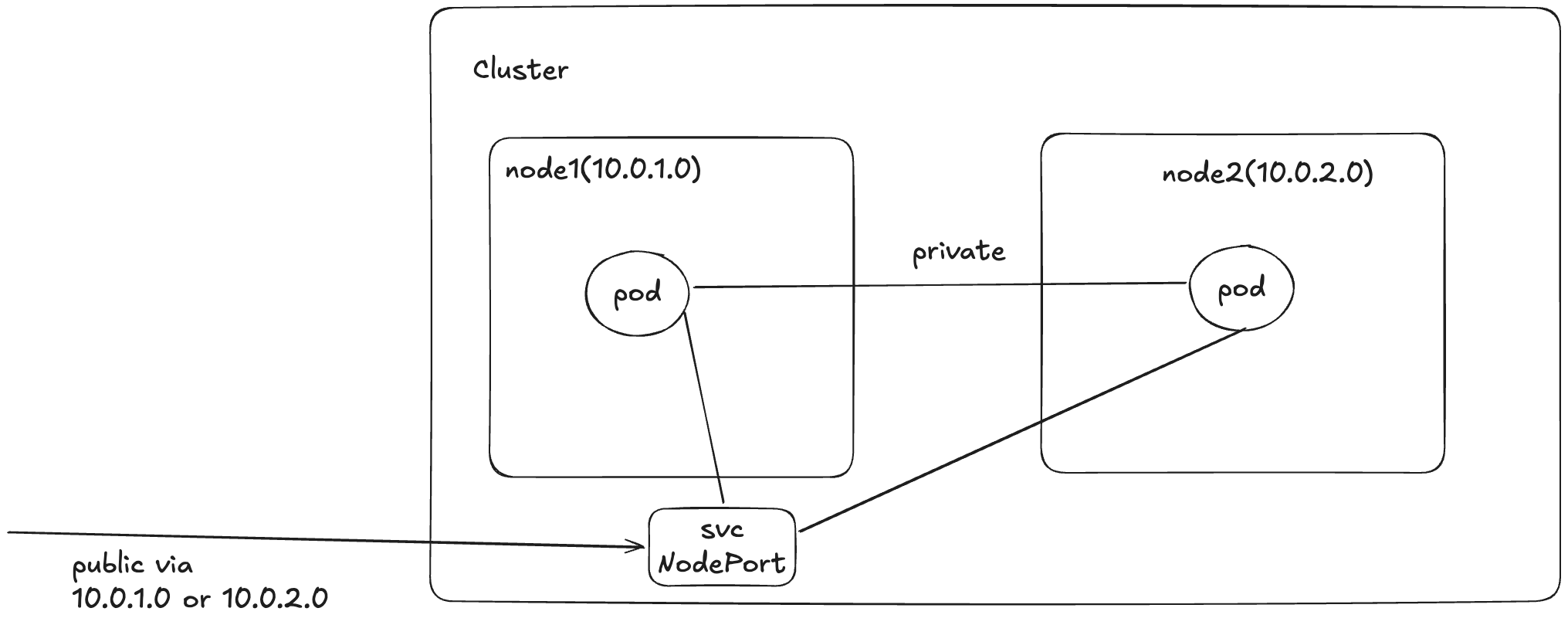
- Load Balancer: This creates a load balancer(probably from the hosted cloud services,
read about metallb for more info), and exposes the pods associated to this service object across nodes using a single IP, for accessing u would enter<LB_IP:PORT>.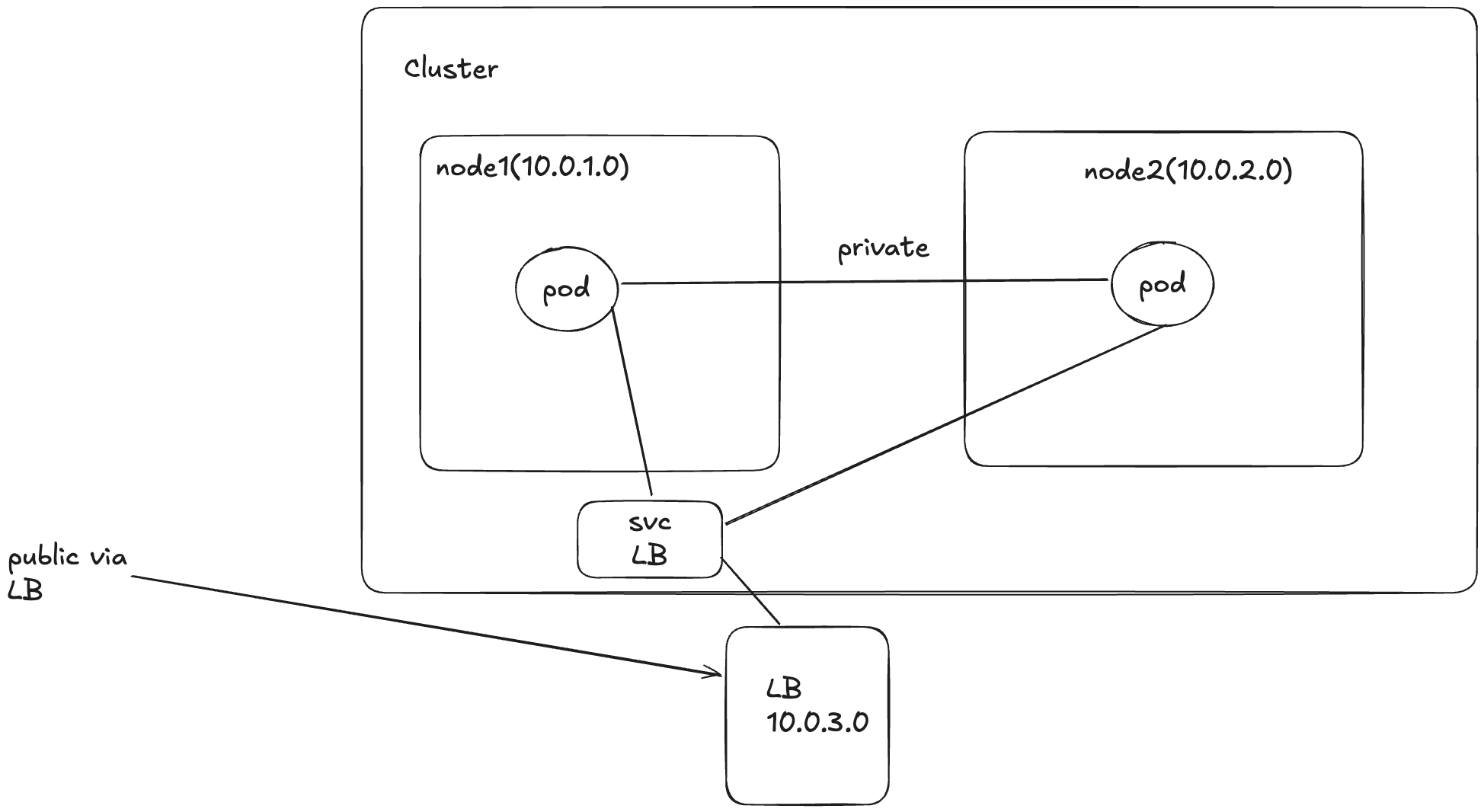
- ClusterIP: Used for internal usage, all pods from different nodes inside the same cluster
can able to access each other, but
All these routing has been done through kube-proxy
when you hit
<NODE_IP:PORT>, even if your application(pod) is in different node, stillkube-proxyredirects to all nodes depending on the routing logic. Now you may have a question,does the NodePort and LoadBalancer are doing the same thing then?. yeah you are right, mostly they are the same thing, the only difference is that, via NodePort you can able to access your application directly using the NodeIP, for example if your pod has been deployed in multiple nodes, even with this single NodeIP you can able to access your application in all the nodes, but if the node failed(which you have the NodeIP) then you can’t literally access your application even though your application is still alive, you need to extract other NodeIP’s or do something from your end to solve this problem. Comparing the above scenario with loadbalancer, it basically one single IP and routes to different nodes where your application recides, so even if one node fails, we don’t need to worry, it automatically fallbacks to other nodes.
-
Via Ingress Ingress also do the same that service does, but with more real life usage. consider the below scenario.
You have a k8 cluster, where you deployed multiple apps(along with their services), where all these services
are public facing, if there is no ingress, you would have created `LoadBalancer` | `NodePort` services
for all these applications
for eg: if u have 10apps deployed, you would have 10 different lbs or more than 10 in case of NodePort.
From the above you can clearly see some headache when deploying multiple public applications within single cluster.
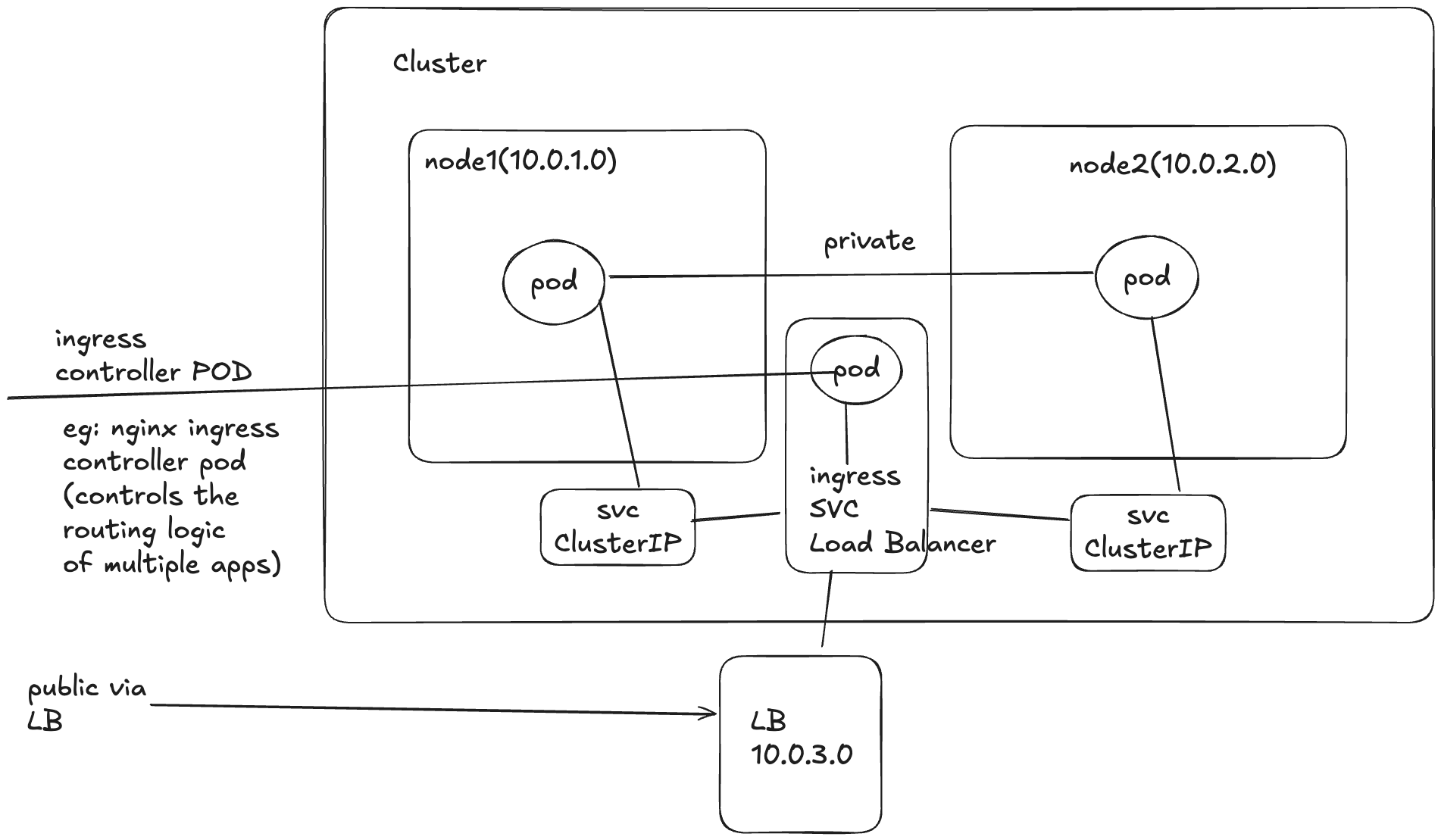
This particular problem is solved by ingress, instead of having each service open to internet, you can create
ingressrules(yaml) for all of your services and have only oneservice(in case of ingress things like nginx, traefik, tyk, kong etc) with typeLoadBalancerthen route across your applications(pods via services).How it routes -> ingress rules uses the
hostheader pluse thepathfrom the incoming request.sample.ingress.yaml - host: app1.example.com http: paths: - path: /api/products backend: service: name: service-a port: number: 80 - host: app2.example.com http: paths: - path: /api/products backend: service: name: service-b port: number: 80From the above example yaml if u see, even if u have same paths in different services, if you have separate domain names ingress will route exactly to that service.
When this won’t work?
- If you have same host for multiple services.
- If the incoming request didn’t had the
host headeroraltered the host header, literally you can play around with this in any of your k8s change your host header from the request domain.
- There are multiple guys provide ingress services to us, one popular ingress is
nginx, you basically need to install nginx-ingress on to ur cluster(this will install nginx-controller-pods, nginx-ingress service with loadbalancer)
apiVersion: networking.k8s.io/v1 kind: Ingress metadata: name: test-nginx-ingress spec: ingressClassName: nginx rules: - host: app1.example.com http: paths: - path: / pathType: Prefix backend: service: name: app1-service port: number: 80nginx-controller-pods- listens every ingress.yaml rules deployed and then converts that to nginx conf, it specifically looks for ingress.yaml which hasingressClassName: nginx, you can also have customingressClassName( but this may require custom yaml files when installing nginx-ingress).- In cloud based services, once you installed the
nginx-ingress, one service with typeLoadBalancercreated automatically(we can also modify it), for EG: AWS provide u anNLB(modern cloud based providers like AWS) - There are also other ways like in aws you can use ALB(edge lb) + nginx(application routing) etc.
This writing just provides an high level overview of how a typical request reaches your kubernetes via various paths, big orgs uses much more complicated things like alb + nginx etc, i hope this writing just gives a basic idea on routing in k8s, if you really got curious upon reading this, please check more on your org level setup you will be amazed.